1. The message connects blocks
The graph passes a payload container. A block reads named fields—also called topics in the documentation—and writes its result to an agreed field. A connection line defines the message route but does not correct mismatched field names.
The minimal chain starts with VideoFrame. As processing proceeds, the message gains detections, tracks, zone attributes, events and a visualized image. The exact object structure is determined by block and runtime versions; the descriptions below explain data roles, not a universal importable JSON schema.
| Data | Purpose | What to check at the boundary between blocks |
|---|---|---|
| image | Source image | Dimensions, format and field name |
| image_timestamp | Frame timestamp | Time units, frame order and timestamp source |
| detections | Objects in a single frame | Categories, bbox, confidence and coordinate system |
| tracks | Objects linked over time | Stable ID, selected classes and attributes |
| zones | Zone geometry and types | Matching zone types and coordinates |
| events | Business rule results | Type, time, object and evidence |
| inconsistencies | Additional nonconformity attributes | Compatibility with the receiving system’s directories |
2. VideoFrame: frequency, dimensions and time
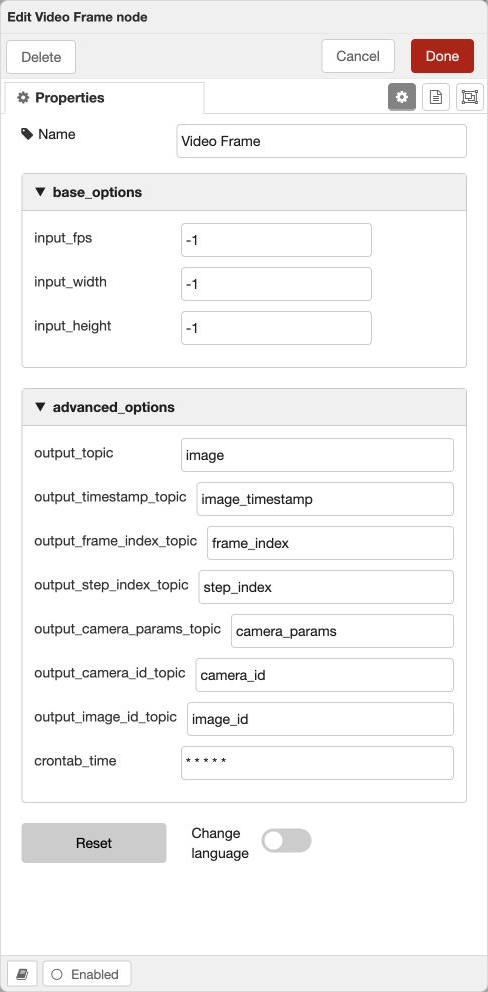
VideoFrame extracts a frame from a camera stream or test video and sets its dimensions and processing frequency. In the documented implementation, −1 for both dimensions preserves the source size; −1 for one dimension preserves the aspect ratio while changing the other. Check support for these values against the form and block version.
Processing frequency f need not equal the video frame rate. At f=5, the scenario analyzes five frames per second. Reducing f lowers compute load but changes the visibility of short actions and the meaning of frame-based thresholds.
Use the source frame’s timestamp for duration logic. Offline processing speed depends on the hardware: ten seconds of video may take more or less than ten seconds of real time to process. A timer based on Python process runtime will distort the result.
Time emulation through an input block parameter is documented for testing the “Schedule” block in the sandbox. Check which time your test supplies: the original recording timestamp, virtual time or the server’s current time.
3. Detector: versions, categories and thresholds
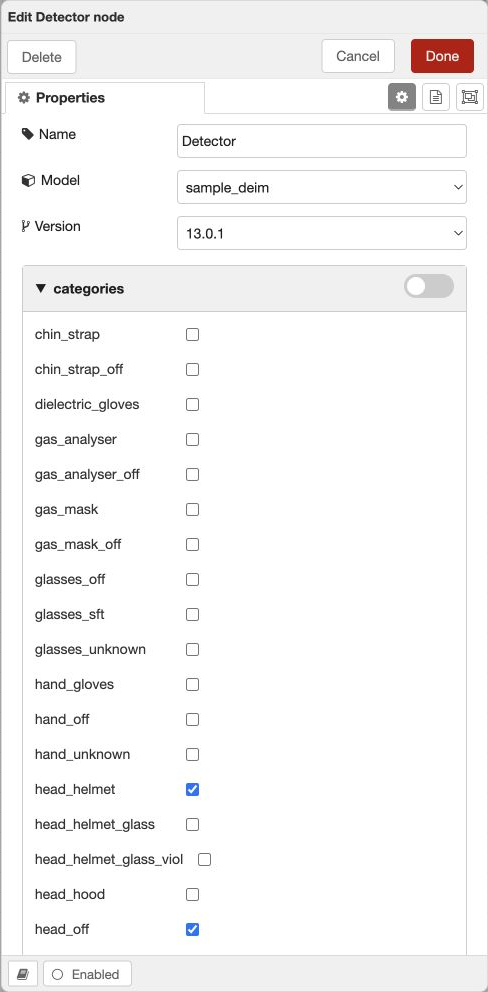
Detector runs the selected model version on the image and generates detections. First check compatibility between the model and the execution method, then select categories and thresholds. A class absent from the model cannot be obtained simply by adding its name to a filter.
In the training documentation, the category threshold and global conf_thres are combined by taking the maximum. For example, global 0.60 and category-specific 0.40 give an effective threshold of 0.60, while category-specific 0.75 gives 0.75. Confirm this with a control test when moving to another version.
Model confidence is not an estimate of the probability of a business violation. The detection threshold controls acceptance of a visual indicator; spatial relationships, duration and the event rule are configured later.
If no boxes appear, first check the source frame and selected categories. Then check the execution format, model loading errors and thresholds. Adding more blocks on top of an empty array makes the cause harder to locate.
4. Tracker: from individual boxes to an object over time
The tracker links detections of the same object across frames and assigns a stable ID. PPE monitoring usually tracks the person, with the hard hat and other items added as attributes.
In the documented Tracker, use_detections switches between using existing detections and running its own detector. When a suitable Detector precedes the tracker, repeated inference may be unnecessary. First check which mode is enabled.
A broken track affects counters and suppression of repeated events. One person with two consecutive IDs may produce two independent accumulations of an indicator. Test occlusion, leaving the frame, merging nearby people and reappearance.
5. DetectionAttacher: whose hard hat is it?
DetectionAttacher associates attribute detections with a track. The described algorithm checks the ratio of the intersection area of a detection and track to the detection’s own area: A(detection ∩ track) / A(detection). This is not IoU, whose denominator is the union area.
A small hard hat inside a person’s box will give a high intersection ratio. In a crowded scene, one hard hat may overlap the boxes of two people. Check both successful attachment and the absence of an incorrect association with a neighbor.
This block usually follows the tracker. If indicators arrive from different branches, first align them by frame and merge them. The selected detections and tracks names must match the outputs of the previous blocks.
6. An absent indicator requires observability
AddRelatedDetection creates a related absence indicator when an expected attribute is not found. The training documentation uses main_object for the expected category, creating_object for the created category, and prefixes for conditions based on other visible attributes and sizes.
For example, checking for the absence of a protective-device bag only makes sense when the person’s torso is sufficiently visible. A size threshold on other detections helps exclude images that are too small or occluded. This does not make the conclusion infallible, but establishes an explicit condition for applicability.
Order matters: first the detector and tracker, then attribute attachment, then generation of the absence indicator and the temporal rule. If you check for absence before attachment, the expected attribute will not yet be in the track even if it is visible in the image.
7. Zones: attribute assignment and filtering
DetectionsZones checks the relationship between an object and a polygon and adds a zone attribute. Possible rules use the bbox center, bottom point or area intersection. These answer different questions: the bottom point more often approximates a position on the floor, while box intersection may trigger on partial entry.
Adding a zone attribute does not necessarily remove objects outside the zone. “Skeleton point in zone” is also described as attribute assignment without filtering. If downstream logic should receive only objects inside, a corresponding filter is required.
“Filter by zone attribute” separates tracks into two outputs: those meeting the condition and the rest. Check the output to which event creation is connected. Reversing the branches produces an apparently healthy scenario with the opposite meaning.
The zone type in the directory, the type in the block and the geometry on the camera must agree. Recheck the boundary after changing the source image dimensions or view.
8. Events based on frame count and events based on time
EventNumViols accumulates a specified track attribute. min_number_violations is the minimum number of frames containing the indicator; time_threshold_between_violations is the interval for suppressing repeated sends for the same track.
A threshold of 10 frames at 5 processed frames/s corresponds to roughly two seconds of observations only with regular processing and the intended accumulation semantics. It does not in itself prove ten consecutive frames or a continuous violation: check state reset and missing frames in your version.
EventDependViols checks for the absence of an expected category over time_depend_viol. The store_state parameter affects memory of a previously detected category: permanently retaining an indicator and checking it repeatedly over a time window produce different events.
Project revisions of EventZoneDependViols describe different result-generation times: after the condition lasts long enough in the zone, or after the object leaves it. Before use, check the actual version with three tests: a person remains inside, leaves before the threshold, and leaves after the threshold. Do not infer the sending time from the block’s name.
| Parameter | What it limits | Common mistake |
|---|---|---|
| Confidence threshold | Detection acceptance | Treating it as a duration threshold |
| Frame count | Number of observations of the indicator | Automatically interpreting it as seconds |
| Time window | Duration measured using frame times | Calculating it from file processing speed |
| Repeat interval | Repeated events for the same object | Expecting global suppression for all tracks |
| store_state | Retention of a detected indicator | Ignoring memory during a repeated episode |
9. Branches, merging and an external signal
Merge combines selected topics with matching names from several branches. Before connecting two detectors, align the field names and check that results from the same frame are being merged. Matching names alone do not describe the runtime’s entire synchronization policy.
python-switch compares an expression’s result with a specified value and lets the message through when the condition is met. The string “1” and the number 1 may behave differently: check the selected value type.
The industrial control system block routes the message according to the value of a camera signal group. An unknown or unavailable signal uses a configured default value. Choosing that value is part of the task logic: it determines whether checking continues when external data is lost.
The “Schedule” block lets a message through when the frame time falls within a specified range. This filtering block inside a video scenario and the scheduler that requests frames for an LLM address different technical tasks.
10. Python block: state and outputs
In the documented python3-function, msg provides access to input data, self stores state between frames, and return controls outputs. None or an empty array for an output stops messages passing through it.
Keep state separate for each camera and object if one block instance can process multiple streams. Account for cleanup when a track ends, on restart and at the start of a new test run. Otherwise, the previous video may affect the next one.
Do not change an existing commonly named field without checking its consumers. A separate name is useful for an intermediate result, which can then be shown in diagnostics. Distinguish an exception inside a block from the absence of output messages.
The following is rule pseudocode, not ready-to-import code: actual time, track and visibility fields come from the installed block’s contract.
for each frame in time order:
    if the source is unavailable or the zone cannot be seen clearly:
        state = UNKNOWN
        do not accumulate evidence of absence
    else if a person is observed in the zone:
        reset the start of observed absence
        state = PRESENT
    else:
        start / continue the interval of observed absence
        if interval >= agreed threshold:
            create an event with its time and evidence
11. Creation, visualization and sending are separate stages
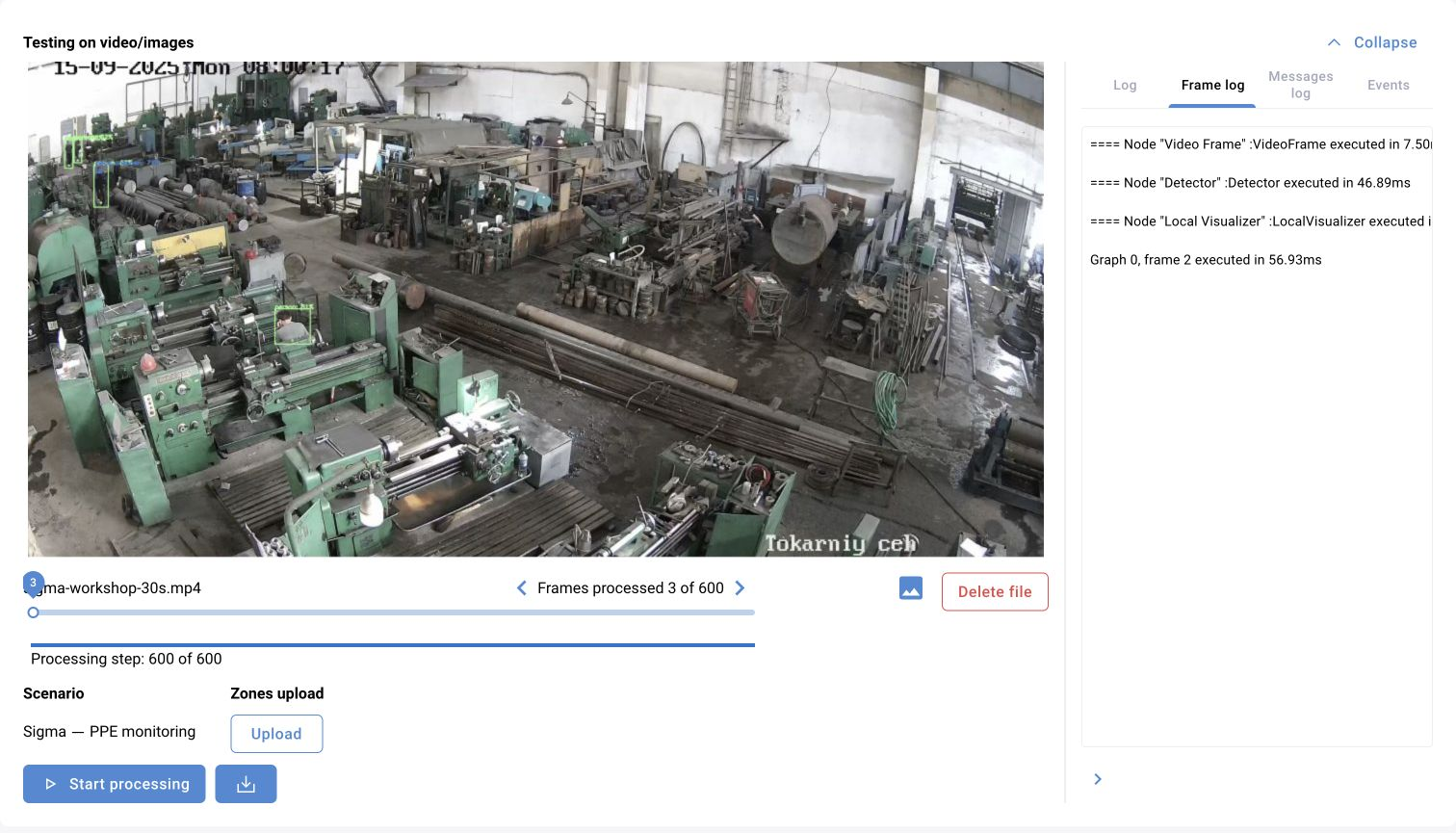
An event creation block adds a result to events. LocalVisualizer draws selected detections, tracks, zones and events. EventSender sends the generated events to the operational system. Filtering or additional processing can be placed between creation and sending.
If boxes are visible but the log is empty, first check for events in the message. Then check the EventSender connection, expected attributes, receiver availability and saving errors. Do not increase detector sensitivity until you have established the stage at which the result disappears.
To check delivery, compare the identifier, camera, time and media. Check duplicates separately: reprocessing a video or changing a track ID must not silently count as a new real incident in the test results.
12. Other blocks: input, output and position in the graph
Palette contents depend on the installation. The reference below helps select the operation class; check available parameters in the particular block’s card.
| Block | Input → result | Characteristic |
|---|---|---|
| Detection classifier | Frame + bbox → refined categories | Works on image regions; it is not equivalent to LLM classification of the whole scene |
| Detection size filter | Detections → detections of an acceptable size | Threshold is in pixels and depends on frame scale |
| Category remap | Detections → renamed categories | In the described implementation, −1 removes a detection |
| Instance segmenter | Image → objects with masks | A mask and a rectangular box represent different geometry |
| NMS | Overlapping detections → reduced set | Check grouping by supercategories |
| Human pose detector | People in the frame → keypoints | Do not treat missing points as evidence of a position |
| Skeleton point in zone | Pose + polygon → zone attribute | Does not filter the stream by itself |
| Pose-based zone | Tracks with pose → conditional branches | Check the selected keypoints and output |
| Filter by category attribute | Tracks → tracks with the required attribute | The attribute must be added before the filter |
| Tracker2 | Object observations → tracks | Check parameters and contract against the selected implementation |
| Nonconformity | Message → additional attributes | Requires alignment with the recipient’s directories |
| Image quality assessment | Frame and context → degradation indicators | Overexposure, blur, displacement, freezing and contamination |
| RegressionBasePoint | Load, person, calibration → position under a load | The project-specific model is calibrated for the particular camera and scene |
13. Debugging plan
Start with the input and add one logical stage at a time. After each step, save the graph and check the video’s control points. The number of blocks is not a measure of scenario readiness.
| Stage | Check |
|---|---|
| Frame | Correct video, dimensions and timestamp? |
| Detections | Have the required objects and categories appeared? |
| Tracks | Does one object retain its ID? |
| Associations | Is the hard hat attached to the correct person? |
| Zone | Does a boundary case follow the expected branch? |
| Time | Do the threshold, reset and repeat work at the intended moments? |
| Event | Does the events object contain the expected result? |
| Delivery | Did the record appear in the log with the correct camera and media? |