
Use the target OpenAPI contract
The target environment’s OpenAPI schema defines available methods, data types, permissions and module-dependent operations. Obtain the schema from the delivery or its approved endpoint. The paths below describe the documented BOX 3.x contract; they are not a Platform 4.0 API specification.
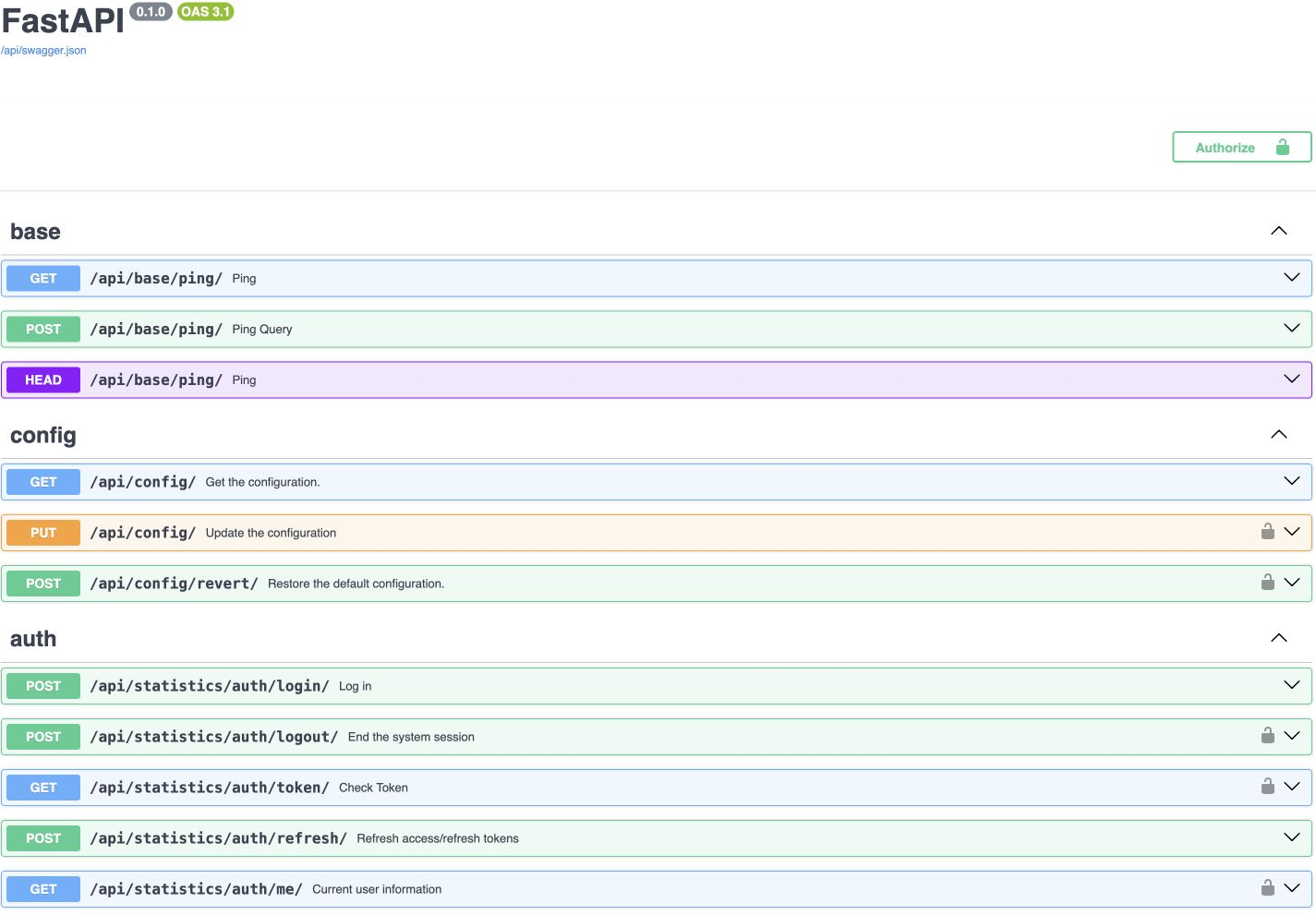
Availability and identity
Begin with GET /api/base/ping/ to check availability without changing business data. The documented contract uses OAuth 2.0 Password Flow. POST /api/statistics/auth/login/ returns tokens, and GET /api/statistics/auth/me/ checks the current user.
Login request
Send application/x-www-form-urlencoded with required username and password. This is not a JSON request. grant_type=password, scope, client_id and client_secret are supported by the described schema where the server configuration requires them.
POST /api/statistics/auth/login/ HTTP/1.1
Host: <box-host>
Content-Type: application/x-www-form-urlencoded

username=<urlencoded-username>&password=<urlencoded-password>&grant_type=password| Response field | Meaning |
|---|---|
| access_token | Token for protected requests |
| refresh_token | Session refresh token; follow the target contract |
| token_type | String or null; bearer is the schema default |
| password_expire_after_sec | Password-expiry information, not the access-token lifetime |
| wait_for_update | Additional account-state indicator |
Protected request
curl -H 'Authorization: Bearer <access_token>' \
  https://<box-host>/api/statistics/auth/me/
Use a dedicated least-privilege integration account. Keep credentials and tokens out of source code and request logs. Token policies and external identity providers are configured per environment.
Event search and pagination
GET /api/statistics/event-storage/events/ supports pagination and filters. Set BOX_ORIGIN to the approved origin without a trailing slash and BOX_ACCESS_TOKEN to the issued token. This example intentionally omits time filters until their units are confirmed.
curl --fail-with-body --get \
  "${BOX_ORIGIN}/api/statistics/event-storage/events/" \
  -H "Authorization: Bearer ${BOX_ACCESS_TOKEN}" \
  --data-urlencode "page=1" \
  --data-urlencode "page_size=20" \
--data-urlencode "sorting=-timestamp"| Parameter | Type / documented default |
|---|---|
| page | integer / 1 |
| page_size | integer / 100 |
| sorting | string / -timestamp |
| from_time / to_time | integer or null; confirm units |
| camera_ids | integer[] |
| scenario_version_ids | integer[] |
| confirmation_statuses | integer[]; use target enum values |
| messages_uuids | string[] |
Serialise array query parameters according to the OpenAPI client; with curl this may require repeated parameters. Check server limits and sorting behaviour in the installed version.
Read the response object
The collection is a StoredViolationEvents object, not a top-level array. Its events field contains StoredViolationEvent records. The response includes page, page_size, page_number and total; verify the precise meaning of pagination fields in the target contract.
- Accept an empty events array.
- Deduplicate using stable event identifiers when polling.
- Handle verification-state updates separately.
- Inspect validation details on 422 and permission scope on access errors.
Main method groups
| Task | Representative groups |
|---|---|
| Sources | camera-storage, mediaserver, video-archive |
| Events | event-storage, event-filter, decision-matrix |
| Models and scenarios | models-registry, scenario-storage, flows-manager |
| Access | auth, access, audit |
| Reference data and assets | directory-storage, asset-storage |
| Reports and adapters | Report generators, alerts and delivery-specific adapters |
Before enabling a consumer
Record schema version, base URL, timestamp units, timezone, identifier formats, pagination, token behaviour and error codes. Start with small read requests; test retries, missing media and schema changes before any write operations.
Schema endpoints and release checks
Open /api/docs/ in your own installation for Swagger, and retrieve its OpenAPI contract from /api/swagger.json. Obtain the approved system origin from its administrator. Store that schema with the client version and compare it whenever BOX is upgraded.
Agree the owner, allowed request rate, idempotency, retries, timeouts and handling of 401/403/404/409/422/5xx. Where the delivery provides an agreed event stream or specialized adapter, use it for event integration rather than repeatedly polling large journals and adding avoidable latency and load.