
Block reference: purpose, fields, and validation
This section covers the blocks described in the scenario development methodology and the additions visible in the current BOX 5.0 palette. The available parameters depend on the NRI version, model, and profile. Values from the earlier manual illustrate what the fields mean; they are not universal production settings.
4.9.1. Video Frame — VideoFrame
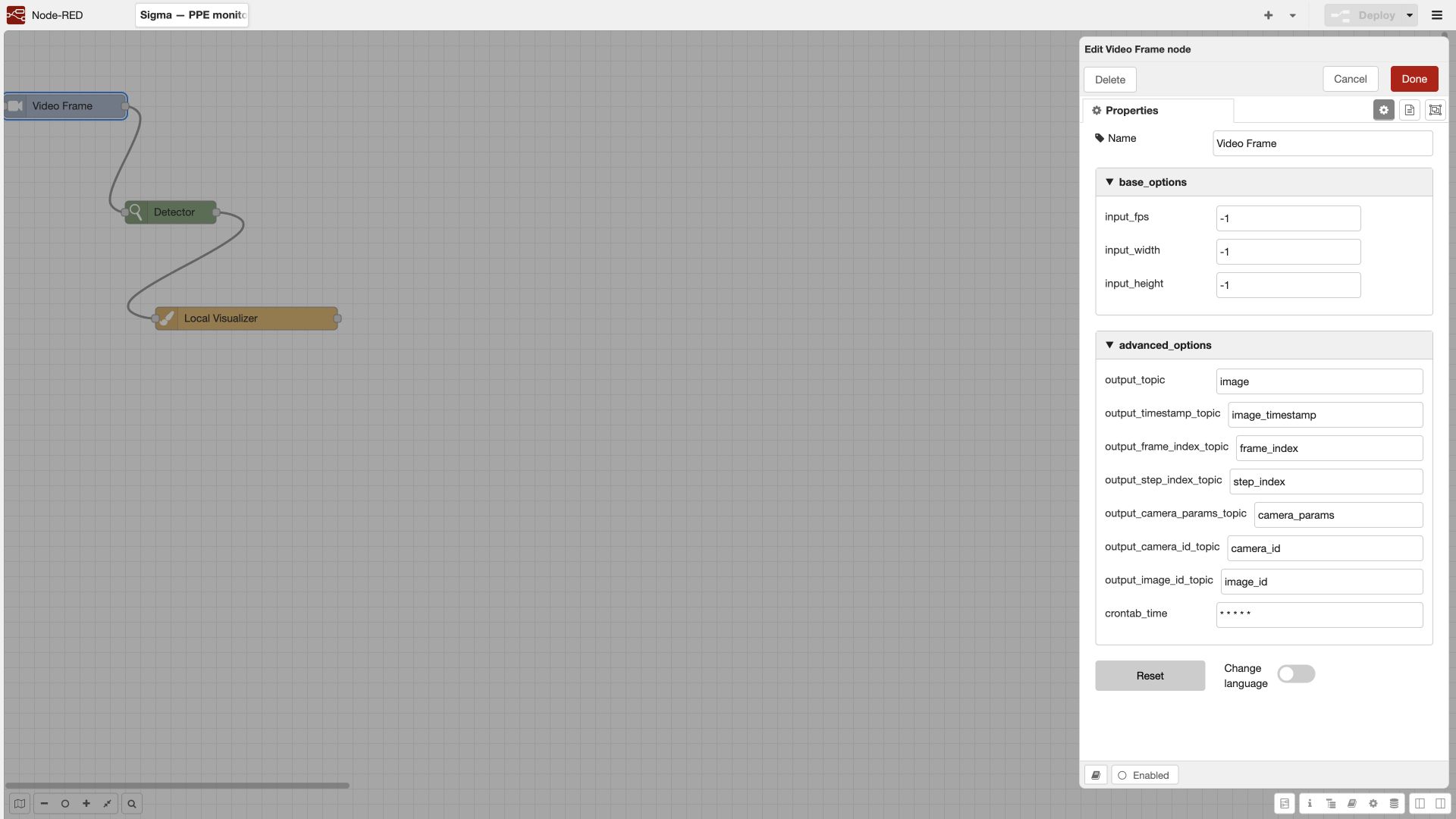
The initial block prepares the frame and message metadata. The current form confirms Input fps, width, height, output topics, and Crontab.
| Field | Meaning and input |
|---|---|
| Input fps | Target processing rate. Choose it according to the speed of the monitored action and the available compute budget; sparse sampling can miss a short event |
| Image width / height | Size for subsequent processing; -1 preserves the original size in the documented mode. Do not enlarge a small frame to create an illusion of additional detail |
| Output topic | Frame name for subsequent nodes, usually image |
| Time, frame index, and step index topics | Required for temporal rules and reproducible debugging |
| Camera parameters, camera ID, and frame ID topics | Associate zones, state, and results with the source |
| Crontab | Simulates time during debugging as described in the block manual; does not replace the live camera schedule |
Validation: open several processed frames and compare frame_index and step_index. When sampling at 25→1 fps, the source frame number and the step number must not be interpreted as the same value.
4.9.2. Detector — Detector
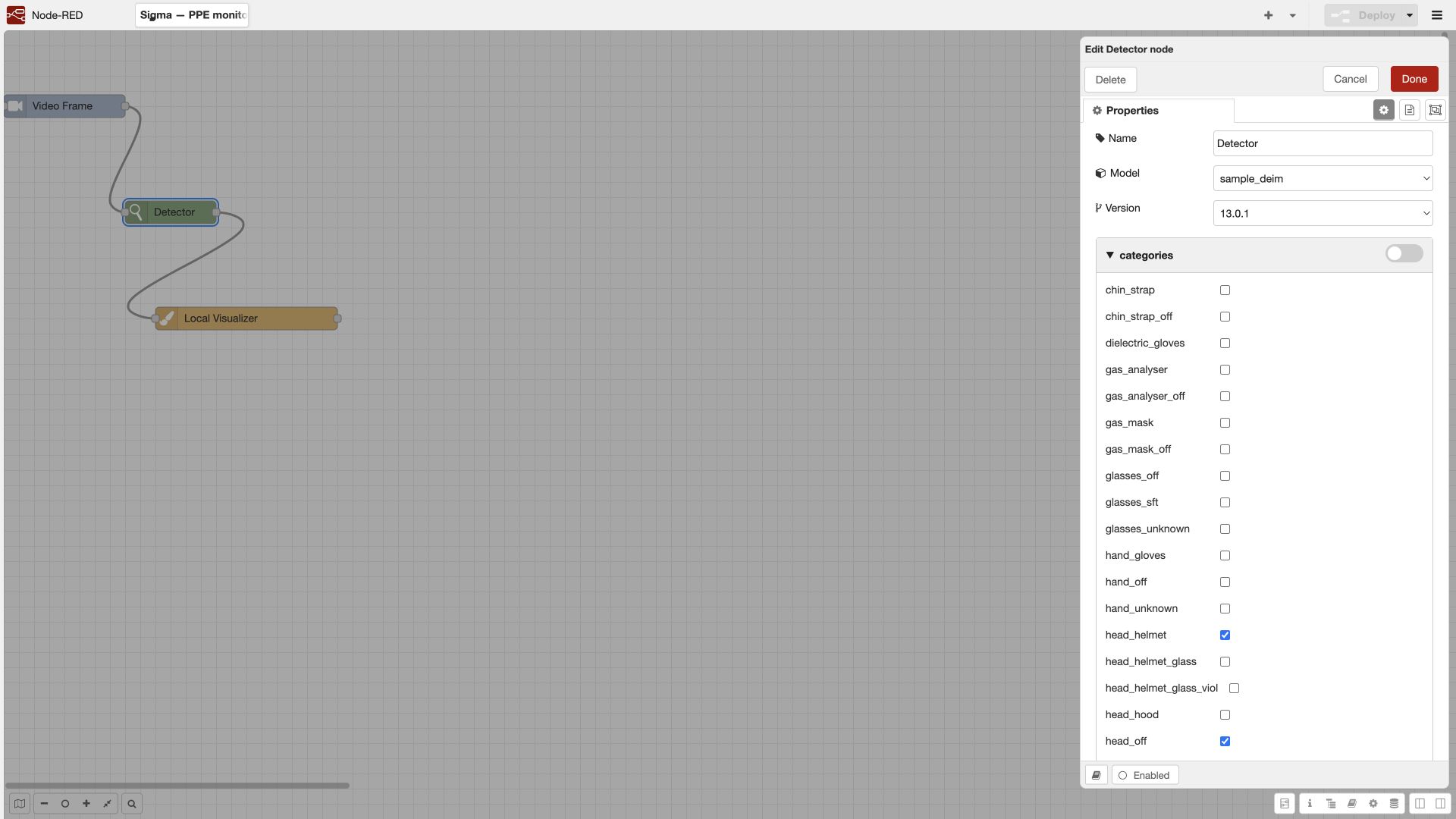
Finds objects of selected categories in a frame. The training graph uses the model sample_deim, version 13.0.1; this is a specific demonstration resource, shown under a neutral sample name here, rather than a mandatory BOX model.
| Field group | How to configure |
|---|---|
| Model / version | Select a published, prepared model and a fixed release |
| Categories | Select the required outputs. PPE monitoring requires the person and specific PPE attributes, not only the absence of a hard hat |
| Category parameters | Confidence threshold for an individual class; tune it using annotated examples |
| Minimum width / height | Reject bounding boxes that are too small, in pixels; account for the size after VideoFrame |
| Model attributes | Model thresholds, including confidence and overlap handling; these depend on the model family |
| Deployment parameters | Supported CPU/GPU profile, ONNX/TensorRT/TorchScript, and precision where available |
| Advanced parameters | Additional minimum threshold, NMS, input and output topics, and image ID |
An early-stage threshold can filter out an object before the class threshold is checked. Lowering only the No hard hat threshold will not restore an object already removed by a stricter global threshold. DEIM documentation includes the specific supercategory threshold value 1.01; do not copy it into an arbitrary IoU filter as if it were a standard threshold in the 0…1 range.
Validation: visualize bounding boxes, categories, and confidence before the tracker. If the required boxes are already missing here, adjusting the time window will not fix recognition.
4.9.3. Tracker — Tracker
Associates detections of the same object across frames. The output includes the history needed for stable events and for attaching attributes to a person.
| Field | Purpose |
|---|---|
| Categories / filtering | Objects to track, for example person. With filtering disabled, the older block may track all categories |
| Run detector | Use internally generated detections or an input that has already been computed. Do not enable repeated inference unnecessarily |
| History length | Number of stored frames/steps; align it with downstream event windows |
| Region expansion / overlap threshold | Object matching conditions; overly permissive matching merges people, while overly strict matching fragments a track |
| Confidence threshold | Condition for accepting/creating a track; the exact rule depends on the version |
Test two people crossing paths, brief occlusion, and a person leaving the frame. Track-based events depend on the track lifecycle: a new ID after occlusion can produce a repeated episode.
4.9.4. Tracker2 — Tracker2
An alternative tracker with its own settings for history, expansion, new-track confidence, inertia, and lifetime. It is not a renamed version of the first tracker. For example, the documented history length and lifetime fields are measured in frames, while inertia controls trajectory updates.
Switch implementations only after repeating tests for crossing paths, occlusions, repeated events, and removal of old tracks. Copying every number from Tracker to Tracker2 does not ensure equivalent behavior.
4.9.5. Attach detection to track — DetectionAttacher
Attaches a detected hard hat, safety glasses, or another attribute to an existing person track. Inputs are tracks and detections; the output is tracks with attributes. Configure topics, categories of attached attributes, and the geometric matching criterion.
In this block, the overlap threshold may be calculated relative to the area of the attached detection rather than as the IoU of two bounding boxes. Do not reuse an NMS threshold without checking the formula. Matching by pose keypoints requires a previously computed pose. Check that another person's hard hat is not attached to the target track.
4.9.6. Attach detection to zone — DetectionsZones
Adds a zone-membership attribute to an object. It does not remove objects outside the zone by itself. Specify zone types and the test method: bounding-box center, bottom-center point/line, or the fraction of the box that overlaps the polygon.
In the documented implementation, the bottom point uses an offset relative to the box height; check it for your camera angle. For an area-based test, set a fraction from 0 to 1. A passerby near the boundary is a mandatory negative test. Follow the attribute assignment with a block that actually uses it for filtering or event generation.
4.9.7. Zone attribute filter — ZoneAttributeFilter
Filters tracks by zone membership using observation history. It has outputs for tracks that meet the condition and those that do not. Select zones/their types, the geometric rule, attention window length, and minimum number of confirmations.
The block can calculate zone membership itself; a preceding DetectionsZones block is not always required. Do not assume that the lower output belongs to the violation branch: test the ports with a person known to be entering and leaving. The minimum number of confirmations must fit within the selected window.
4.9.8. Category attribute filter — CategoryAttributeFilter
Selects tracks by attached attributes, such as No hard hat observations. Configure categories, the attention window, and the minimum number of matches. Some versions can run their own detector; if detections have already been computed upstream, check whether this adds redundant inference.
An inverse-condition parameter appears in older descriptions but may be deprecated. A missing attribute must be distinguished from a positively detected missing-PPE class. Test an unknown/occluded object separately from a violation.
4.9.9. Create events — EventNumViols
Converts a sustained sequence of observations into an event. Select the result category, minimum number of violations, history length, and repeat interval; configure inputs for tracks, frame, time, camera ID, and the output events.
The manual for this block specifies history and interval in frames, for example, 3 confirmations within a history of 180 frames, with a repeat after 180 frames. These numbers are not ready-made Sigma settings. For K confirmations across N observations, the condition is K ≤ N, and FPS affects the window duration.
The inverse condition applies to data in an existing track. It does not solve the empty-workplace case when no person track has been created. To detect absence from a workplace, use the zone state described in §4.17.
4.9.10. Create dependent events — DependentEvents
Creates an event when conditions/categories occur together over time. Fields include the event class, decision window, repeat interval, selected categories, and state-retention mode.
In this block, the documented time parameters are measured in seconds: do not copy numbers from EventNumViols without conversion. State retention can preserve a detected attribute until the track ends; without retention, the attribute stops contributing after the window expires. Test a person who initially violates the condition and then corrects the violation.
4.9.11. Create events in a zone — EventsInZone
Used for events that depend on an object staying in a zone and having the required attributes. The source describes a minimum time in the zone and a result generated on exit if a mandatory attribute has not appeared.
For your block version, check when output is produced: while the object is present, on a timer, or after exit. The older description repeats passages from another block, so it cannot establish the exact behavior of every implementation. Acceptance test: enter → stay for less than the threshold → leave; then test a longer stay; then a required attribute appearing before exit. Record actual event times.
4.9.12. Event sending module — EventSender
Passes events that have already been generated into the system. Connect the events topic and the required frame and camera data according to the block form. In the older interface, the events input could be labeled Tracks topic; check the actual contents as well as the label.
An empty events list does not create a record. Bounding boxes in the visualizer are not an input to the sender. A complete test ends by finding the event in the journal with the correct camera, category, and time and, where required, confirming delivery of the notification.
4.9.13. Local visualizer — LocalVisualizer
Draws results for debugging: bounding boxes, confidence, tracks, events, text, masks, zones, and pose. Configure the relevant input topics, line thickness, text scale, image quality, and the number of frames for which an event is displayed. The output is usually visualized_image.
Do not connect unknown topics just in case. If boxes are missing, first make sure the visualizer reads the list produced by the detector. The visualizer does not replace EventSender and does not confirm that a journal record exists.
4.9.14. Detection classifier — DetectionClassifier
Crops detected object regions and classifies them using a separate model. Select the model/version, profile, frame input, and detections input. The result may change the category of the original detection; if downstream logic still needs the original car meaning, preserve it in a separate branch or a supported field.
Example: detect a vehicle first, then classify its type. Test small and partially cropped boxes: a good vehicle detector does not guarantee sufficient visual information to identify the make or model.
4.9.15. Instance segmenter — InstanceSegmentation
Returns masks of individual objects and associated boxes. Configure the model, version, categories, thresholds, and execution profile. The consumer must support masks: a block expecting only a rectangle does not automatically start using the object's shape.
Validate by visualizing the mask and boundaries on the original frame after scaling. Changing the resolution requires another geometry check.
4.9.16. Human pose detector — Pose
Calculates human keypoints within detected regions. It requires a frame, person detections, a pose model/version, and a keypoint confidence threshold. The output is used by blocks for monitoring body parts and pose-based zones.
Do not interpret a missing wrist or ankle keypoint as a violation: it may be occluded. Test a partially cropped person, a person facing away, and occlusion. Deprecated switches from older documentation may have no effect on a newer implementation; rely on the form and output validation.
4.9.17. Skeleton point in zone — PointSkeletonZone
Adds an attribute indicating that selected body parts are in a zone. Select the zone type, skeleton points, and the combination rule AND / OR. AND requires all selected conditions to hold; OR requires at least one.
The block adds an attribute but does not necessarily filter the message. Configure a consumer of that attribute downstream. Test missing/low-confidence keypoints and behavior near the zone boundary.
4.9.18. Pose zone — PoseZoneFilter
Filters by keypoints inside a zone and provides separate matching/nonmatching outputs. Configure body parts, AND/OR, the attention window, and the number of confirmations. Do not confuse this block with the attribute assignment performed by PointSkeletonZone.
Visualize keypoints before testing the condition. Some older overlap fields are marked as unused in the documentation; changing such a field must not be treated as an effective algorithm setting.
4.9.19. Detection size filter — MinSizeFilter
Rejects boxes smaller than the specified size. The threshold can be set by category; units are pixels. If the width or height fails the minimum, the documented implementation excludes the object.
Use it to remove distant objects that cannot be distinguished, but record the boundary of the reliable monitoring zone. Do not present a discarded small person as proven absence of people.
4.9.20. Remap categories — RemapCategories
Renames category codes according to a mapping table. The value -1 excludes a category in the described mechanism. Enter exact machine codes rather than arbitrary display labels.
Example: map categories from two compatible models to a shared vocabulary for downstream logic. Check all consumers: after remapping, the filter, tracker, and event must expect the new codes.
4.9.21. NMS
Removes duplicate boxes based on geometric overlap and the selected category rules. The main field is the IoU threshold. A high threshold generally retains more overlapping boxes; a low threshold suppresses them more strongly. Check the exact behavior in your implementation.
If the model already performs NMS, the second stage must have a clear purpose. The supercategory parameter has changed across library versions. Test people standing close together: removing a duplicate and incorrectly suppressing a neighboring person can look similar.
4.9.22. Merge — Merge
Combines selected data from branches, such as detection lists. Specify the inputs and result topic. It is not a general-purpose mechanism for correlating arbitrary asynchronous events.
Combine results from the same frame with consistent coordinates. After merging, check duplicates, order, categories, and IDs. If branches run at different rates, explicitly define their synchronization policy in the executor being used.
4.9.23. Add related detection — AddRelatedDetection
Creates a related attribute if a required detection is missing from a track at the current step. Some configurations specify category prefixes and minimum sizes, for example separate limits for upper-body and lower-body clothing.
Use it only when the base object is observable and the camera angle is suitable. A jacket not detected on a partially hidden person is not equivalent to reliably established absence of protective clothing. Check how the block represents uncertainty and how the next node interprets the generated attribute.
4.9.24. Schedule — Schedule
Allows processing within a specified time interval. Configure the time zone and boundaries using the supported crontab format. According to the documentation, the block uses frame time image_timestamp; the VideoFrame test-time setting helps reproduce boundary cases.
Test shift start, shift end, midnight crossover, and the time zone. An employee work schedule, a camera activation schedule, and a scenario schedule are three distinct mechanisms. If the filter completely stops messages outside the shift, downstream state must terminate or reset correctly.
4.9.25. python-switch — PythonSwitch
Conditionally passes a message according to an expression. This block is present in the current palette; the older description calls the expression field Priority. The example len(msg.get("detections", [])), a comparison operator, and the value 0 with type num can be used to test the number of objects.
In the documented implementation, a true condition passes the message, while a false condition or expression error blocks it. It is not a complete multi-output switch without additional configuration. Do not place this condition before logic that detects the absence of people: an empty list must also reach the absence logic.
4.9.26. python3-function — Python3Function
Implements a calculation unavailable in the ready-made nodes. Write code according to the installed block's contract, return the expected message, and preserve required fields. A simple transformation example without state accumulation:
# Training example. Check the detections schema in your version's Message Log.
msg["sigma_detection_count"] = len(msg.get("detections", []))
return msg
This example counts all supplied detections; it does not determine the number of people without checking categories. For state between frames, use only the documented executor context mechanism. Do not treat a function-local variable as persistent storage. Separate state by camera, zone, and rule version; account for restarts, gaps, and cleanup.
4.9.27. Process control and process signals
In the scenario development methodology, the process-control block selects a branch according to external signal states: in the described implementation, at least one active signal of the selected type selects one branch, all inactive signals select the other, and missing data uses the default value.
This block is described in project documentation, but its availability as a separate item in the current palette has not been confirmed. Use the installed integration block or an agreed extension. Specify the signal type, equipment mapping, time source, and maximum data age. The older test value default=true is not a safe default for a production process.
A third case is mandatory: no reliable signal. Agree on its handling with the process owner: a diagnostic event, suspension of the condition, or another defined procedure. A lost connection must not silently be treated as a stopped machine.
4.9.28. Nonconformity / project classification
The scenario development methodology describes mapping to a project-specific nonconformity dictionary: nature, area, type, hazard, barrier, description, and related classifications. These provide consistent delivery of the result into the customer's process.
In a general-purpose BOX deployment, use the available violation type and an agreed classification. Do not add fields specific to an internal project solely because they appear in a methodology guide; first confirm the relevant integration. This block does not replace evidence that the violation condition occurred.
4.9.29. Image quality assessment — ImageQuality
Monitors input quality: blur, overexposure, camera displacement, frozen video, and contamination where a suitable model is available. Fields include enabling individual checks, analysis interval, window length, thresholds, reference good frames, and event interval.
Different metrics use different scales. A blur threshold cannot be copied into a displacement comparison. The source contains analysis intervals in seconds and event intervals in frames; verify the units for every field. Select a reference with the correct camera angle and a normal image; otherwise the system will treat a faulty condition as normal.
Quality checks are useful before monitoring the absence of people and when diagnosing gaps. When frame quality is poor, the business-rule result becomes unknown rather than automatically becoming violation or normal.
4.9.30. Additional blocks in the current palette
BOX 5.0 also shows Custom pose detector, Base point regression, Person under suspended load: regression and homography, LLM Integration and LLM Client. Their presence is confirmed by the palette; the detailed contracts and practical execution of these implementations were not tested during this review.
Base point regression and homography address geometric tasks; use requires a calibration method for the specific model and scene. For LLM, define the input frame/context, response format, timeout, and error behavior. General LLM modes are described in chapter 11; the presence of a graph node alone does not prove that a remote model works.